
You sign up for ChatGPT, spend a week getting comfortable, then hear that Gemini is better. So you switch. Two days later, you’re second-guessing the move, and now you have two browser tabs open and zero clarity. Most people land in this loop within their first month of using AI tools. If you’re weighing ChatGPT vs Gemini right now, this guide is built for exactly that situation, both tools are genuinely good, just at different things.
The ChatGPT vs Gemini debate dominates AI discussions in 2026 because neither option is obviously wrong. OpenAI and Google have built two powerful tools with two distinct philosophies, and the right pick depends entirely on what you’re actually trying to do. The team at Techiein.com has tested both tools extensively, writing tutorials, running real workflows, and fielding questions from readers caught in exactly this situation. This guide cuts through the noise with a clear, side-by-side breakdown so you know which AI to open tomorrow morning.
What makes ChatGPT and Gemini fundamentally different
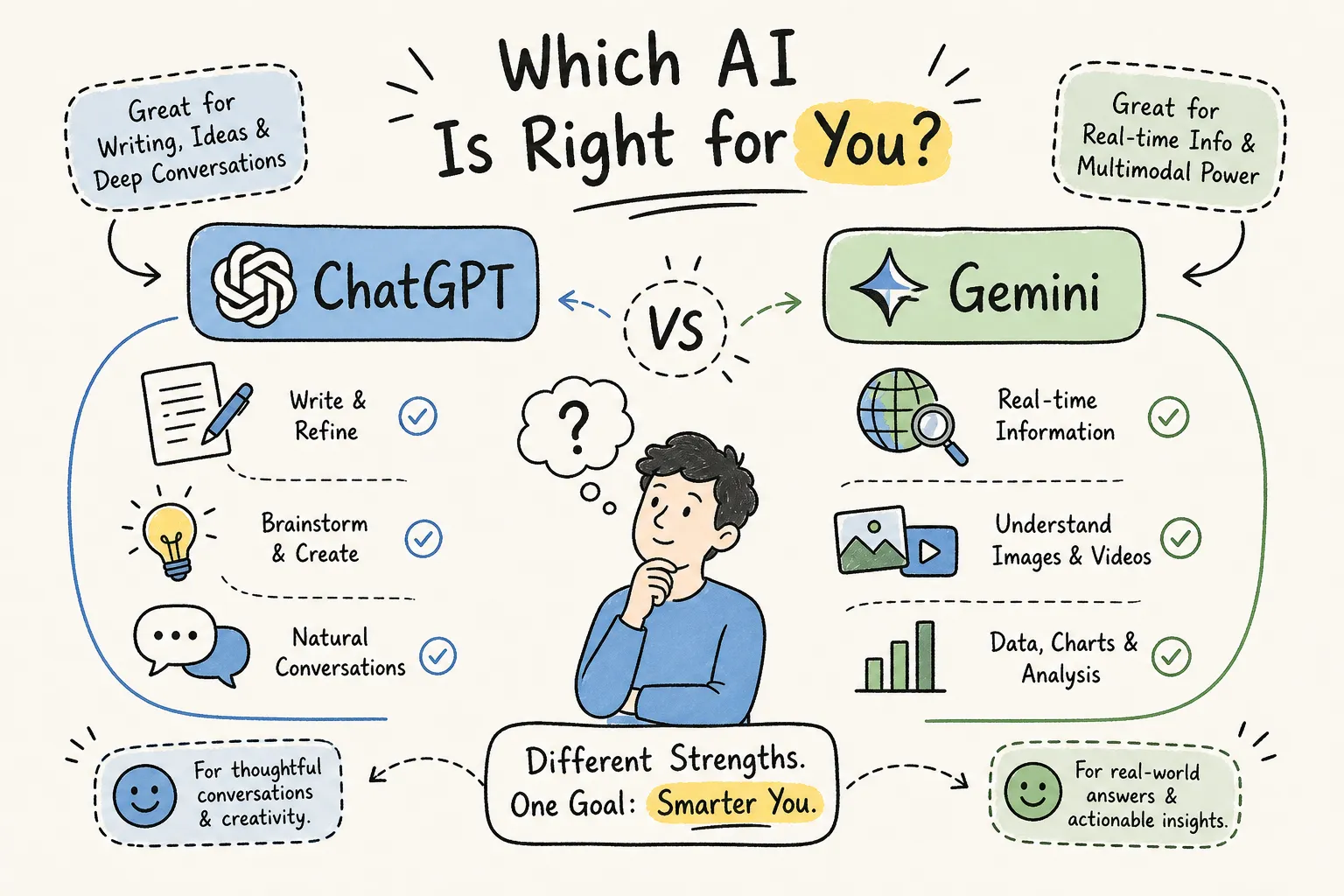
Before comparing specific features, it helps to understand what each tool was built to be. ChatGPT, developed by OpenAI, is a standalone AI assistant designed around instruction-following, creative writing, and increasingly, agentic task completion. Its core strength is understanding precisely what you ask and delivering polished, well-structured output. GPT-class models powering ChatGPT have become a reliable standard for that kind of work.
Gemini, built by Google, was designed from the ground up as a multimodal model. It natively understands text, images, audio, and video together as a unified system, not as bolt-on features added later. Beyond that, Gemini benefits from deep integration with Google Search, Gmail, Docs, and YouTube, which gives it a real ecosystem advantage for users already living inside Google’s suite of tools.
The single most useful mental model: ChatGPT wins on polish and ease of use for text-based tasks. Gemini wins when you need to process multiple content types, tap into Google’s ecosystem, or work with very large documents at once.
ChatGPT vs Gemini, free tier breakdown
Most readers will start with the free plan, so understanding exactly what each tool offers at $0 matters more than any paid-tier comparison. The differences are real, and they shape your day-to-day experience before you ever consider upgrading.
ChatGPT’s free plan in practice
The free version of ChatGPT gives you access to a GPT-class model with daily usage limits. Within those limits, you get solid conversational AI, basic image generation through DALL-E, voice mode access, and the ability to attach files for limited analysis. Once you hit the cap, the tool downgrades to an older, less capable model, so heavy users will notice the ceiling quickly, especially on complex multi-step tasks. For casual writing, quick answers, and brainstorming, the free tier still delivers genuine value.
Gemini’s free plan in practice
Gemini’s free tier runs on the Gemini Flash model with a 32k token context window. While that’s smaller than the paid tiers, Gemini Advanced unlocks significantly more context, and Google’s top tier opens up 1 million tokens, 32k handles most everyday tasks comfortably. The free tier also includes multimodal input, meaning you can drop in images and ask questions about them without spending a cent. For official details on context windows and limits, see the Gemini context window documentation. For anyone already using Google tools daily, the free Gemini tier feels like a natural extension of what you’re already doing rather than a brand-new app to learn.
Which free tier gives you more
For casual everyday use, Gemini’s free tier edges ahead because of its multimodal input and seamless Google integrations. ChatGPT’s free tier is stronger for creative writing quality and conversational depth on text-focused tasks. Neither will feel limiting if you’re just getting started, but as your needs grow, the differences become more meaningful.
ChatGPT vs Gemini for creators: writing, social media, and image generation
For the creators, writers, and social media users who make up a big part of the Techiein.com audience, benchmark scores matter less than a simple question: which tool makes better content? The real-world experience diverges sharply here.
Writing quality and tone control
ChatGPT has a genuine edge for long-form creative writing. It follows stylistic instructions more reliably, adjusts tone on request, and produces consistently polished output for blog posts, captions, and email copy. Tell it to write like a Gen Z TikTok creator, then switch to a formal business tone, and it delivers both convincingly. Gemini is strong here too, but it tends toward more generic output on creative prompts, especially when you’re pushing for a distinctive voice.
Image generation: DALL-E vs. Imagen
ChatGPT uses DALL-E for image generation, which excels at creative stylization, text-in-image accuracy, and handling complex visual prompts. It’s the safer default for social graphics, quote cards, YouTube thumbnails, and branded promotional assets. Gemini integrates Google’s Imagen model, which produces stronger photorealistic results overall, more accurate lighting, realistic textures, and editorial-quality lifestyle visuals. For creators who produce a lot of product imagery or travel content, Imagen often wins on visual realism. See practical prompt examples and mixed-media workflows in our Gemini Ai Photo Prompt Trending Mixed Media, Techiein.com, Latest Tech News write-up for creative inspiration.
Social media captions, hooks, and content ideas
For TikTok captions, Instagram hooks, and short-form content ideation, ChatGPT is more tuned to viral content formats. It produces punchier copy, handles brand voice more fluidly, and generates multiple strong variations faster. Gemini’s practical advantage in this space comes from its multimodal input: you can drop an existing image or video clip into a conversation and ask it to generate captions directly from that visual context. If your workflow starts from text, lean toward ChatGPT. If you’re working from visuals, Gemini’s multimodal approach is hard to beat. For visual-first caption exercises we published an example prompt for watercolor-style assets in Summer Girls Watercolor Gemini Ai Photo Prompt, Techiein.com, Latest Tech News.
Coding, research, and working with large documents
Not every reader is a developer, but more everyday users are turning to AI for research, PDF analysis, and writing basic scripts. This is where the technical differences between these two tools translate into genuinely different outcomes.
Coding performance
ChatGPT is the stronger choice for coding and software-related workflows in 2026. In head-to-head evaluations such as SWE-bench, GPT-class models perform better on practical, multi-step coding tasks and agentic workflows, where the AI executes a sequence of actions rather than just answering a single question. Gemini leads on raw reasoning benchmarks like GPQA Diamond, but for the tasks most users actually care about (debugging, writing functions, explaining code in plain English), ChatGPT is more reliable and consistent. A useful way to frame the Gemini AI vs ChatGPT divide here: Gemini reasons harder; ChatGPT codes more practically.
Handling long documents and research tasks
Gemini’s massive context window is its biggest functional advantage for research work. At the top paid tier, the 1 million token limit means you can load an entire 1,500-page document or 30,000 lines of code into a single session and ask questions across all of it at once. ChatGPT’s context window sits around 128k tokens in most configurations, capable, but meaningfully smaller. For students, researchers, lawyers, and anyone regularly working through lengthy reports or academic papers, Gemini is the stronger tool.
Factual accuracy and data reliability
Gemini edges ahead on factual recall in recent benchmarks, including SimpleQA Verified, largely because of its tight connection to Google Search’s underlying data infrastructure. ChatGPT remains highly capable but can still produce confident-sounding errors on niche or obscure facts. For research-heavy use cases where accuracy directly matters, Gemini’s search-grounded responses give it a real practical advantage. If you need to review enterprise-specific security and compliance details for Gemini, consult Google’s Gemini enterprise security overview.
Which AI is actually right for you
Here are direct recommendations by use case, based on everything covered above.
Best pick for everyday users and beginners
Start with Gemini. The free tier is generous, the Google account sign-in removes setup friction, and multimodal input makes the experience feel natural from day one. If you already use Gmail, Google Docs, or Google Drive, Gemini integrates with those tools immediately. It’s the lower-effort starting point, and for most casual tasks it delivers strong results without requiring you to learn much.
Best pick for creators and social media content
ChatGPT is the better choice for creators who work primarily with text: captions, scripts, blog posts, and email newsletters. Its writing quality and tone control are more refined for marketing-style copy. If your workflow begins with visual content and you need AI to analyze images or video clips and respond to them contextually, Gemini closes that gap significantly. Creators who work across both formats may want to keep both free tiers active and use each where it’s strongest.
Best pick for coders and heavy-duty research
ChatGPT wins for coding, particularly for multi-step debugging, function writing, and code explanation in plain English. Gemini is the better research companion for reading and summarizing large documents, academic papers, or lengthy reports. Developers who do heavy documentation work alongside their coding projects may genuinely benefit from using both tools strategically rather than committing to just one.
How to start using your chosen AI today
The fastest way to lose momentum is to keep researching instead of actually trying the tool. Here’s exactly what to do in the next 30 minutes.
Getting started with ChatGPT
Go to chat.openai.com and create a free account. The onboarding is minimal and straightforward. The key habit to build from day one: give specific, detailed prompts rather than vague questions. The more context you include, your audience, your goal, your tone, the more useful the output.
Getting started with Gemini
Go to gemini.google.com and sign in with your Google account. If you already use Gmail or Docs, the interface will feel immediately familiar. Start by uploading an image or pasting a long article and asking a specific question about it. The multimodal experience is one of Gemini’s most distinctive features, and trying it early gives you a real sense of what sets it apart. If you want to double-check privacy and admin controls before connecting a Workspace account, review the Google Workspace privacy hub for guidance on data handling and admin settings.
Techiein.com has a full hands-on Gemini beginner guide covering the free tier features, the best starting prompts, and how to connect it to your Google Workspace for maximum usefulness. We also publish practical example prompts and creative projects such as 3D Celebrity Caricatures Gemini Ai Photo Prompt, Techiein.com, Latest Tech News to help you get started quickly.
Your next move: pick one and go
The biggest mistake new AI users make is overthinking the choice instead of starting. Pick the tool that fits your primary use case based on this guide, spend 30 minutes with it today, and come back to the other one once you’re comfortable. Both tools are improving rapidly throughout 2026, and staying curious is the real competitive advantage. Both ChatGPT and Gemini keep updating fast, new model releases can shift the comparison from month to month. For coverage of recent subscription and tier changes, see this reporting on Gemini Ultra AI subscription tiers and how paid plans are evolving in 2026.
The bottom line
ChatGPT is the better choice for creative writing, social media content, and coding workflows. Gemini wins on document analysis, research tasks, factual accuracy, and multimodal projects. The free tiers on both platforms are capable enough for meaningful experimentation before you pay anything, Gemini offers 32k tokens and multimodal input; ChatGPT gives you conversational depth and creative polish. The right answer in the ChatGPT vs Gemini debate isn’t universal. It depends entirely on what you actually need to do every day.
Start today rather than waiting for the perfect setup. Both tools keep updating rapidly, new models drop regularly, and the gap between them narrows and widens depending on the month. Staying informed is what separates users who get real results from those who stay stuck in tool-switching loops. That’s exactly what Techiein.com is here for, plain-English breakdowns, hands-on tutorials, and timely updates so you always know where things stand.

TechieIn was founded by MD BELAL, a tech enthusiast driven by a passion for digital innovation and storytelling. With a vision to create a reliable hub for tech lovers, Belal ensures that every piece of content shared here is valuable, timely, and easy to understand.
Thank you for being part of our community. Stay connected, stay updated!